Clean up duplicate and dead contacts on iPhone from a Mac
For duplicate names, start with what Apple already gives you: in the Contacts app on the iPhone, tap View Duplicates under My Card and merge what it finds. That only covers cards with the same name. Numbers saved with an old IP dialing prefix, landlines without an area code, empty cards and people you have not spoken to in years need a different tool. Yado's Tidy Contacts lists those on the Mac, you tick what goes, and iCloud carries the deletion to the iPhone. It works on iCloud contacts only, and it saves a copy of every card before deleting.
What iOS, iCloud and macOS already do
On the iPhone, Apple's guide Get rid of duplicate contacts on iPhone says that if you have more than one card with the same first and last name, you open Contacts, tap View Duplicates below My Card, then tap single cards to review and merge them or tap Merge All. For the same person in different accounts, tap Edit, then Link Contacts, and choose the other entry. Apple notes that linked cards are not merged: they display as one unified contact while each account keeps its own card.
On a Mac, Contacts has the same idea. Apple's merge page says to choose Card, Look for Duplicates, then click Merge, or select cards yourself and choose Card, Merge Selected Cards.
If a deletion goes wrong, iCloud has a safety net of its own. Apple's page If you accidentally deleted your contacts says to sign in at iCloud.com, scroll to the bottom and choose Data Recovery, then Restore Contacts, then click Restore next to a date before the deletion and confirm. iCloud saves your current contacts first, and the restored version replaces the contacts on all your devices.
Those tools merge and link cards that repeat each other. None of them looks at whether a number still works or knows when you last called someone.
What Tidy Contacts looks at
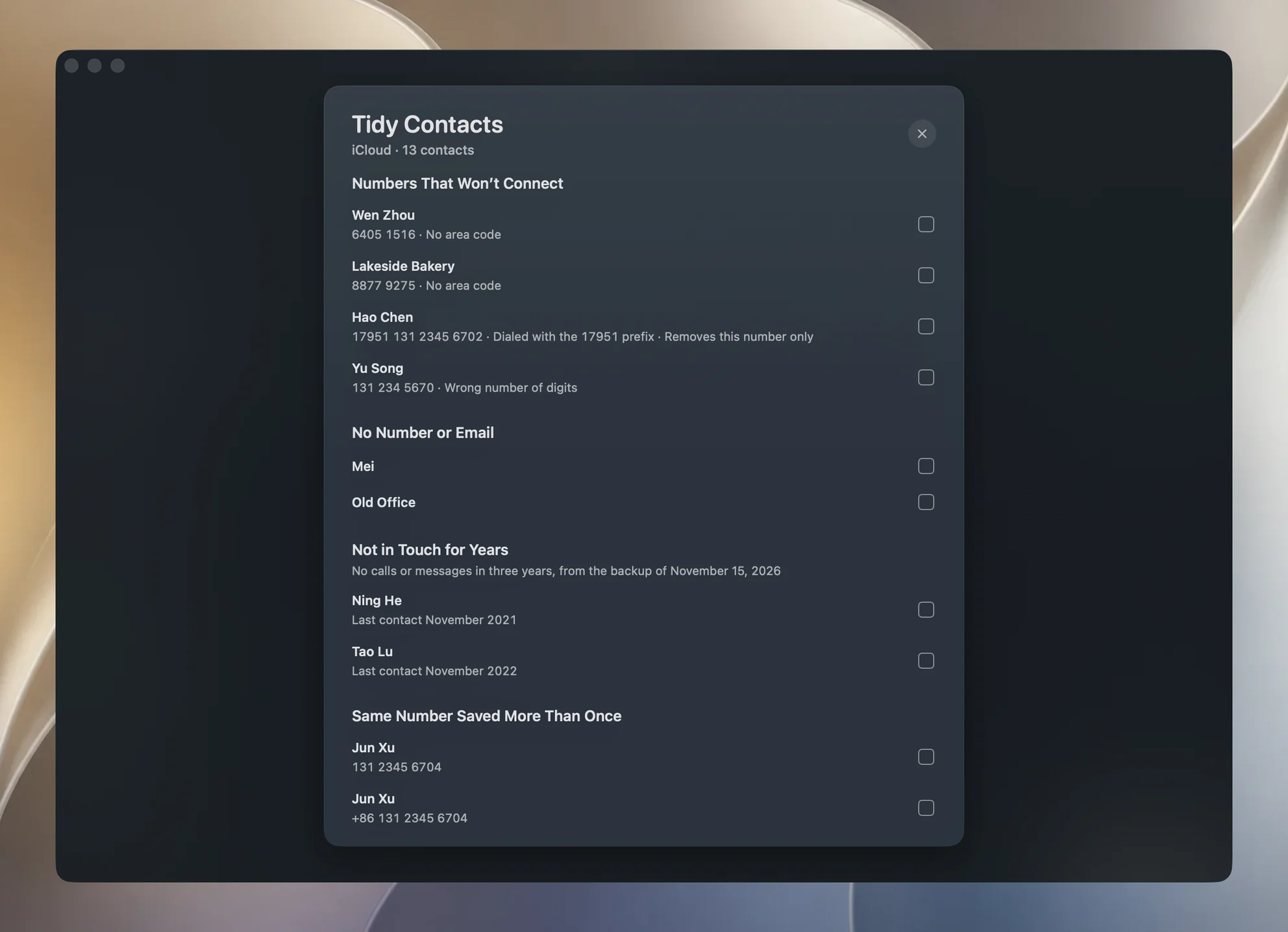
Tidy Contacts is the last section of the Clean tab, called Organize, with one Contacts row and a Check button. The row has no tick, since contacts take up no space. Click Check and it reads your cards, then lists five kinds of problem.
Numbers That Won't Connect flags three shapes and nothing else:
- an IP dialing prefix in front of a Chinese number, such as 17951 or 12593, which carriers no longer need (the row says Dialled with the 17951 prefix);
- a landline saved without its area code (No area code);
- a Chinese mobile number with digits missing or added (Wrong number of digits).
Service numbers are never flagged. In a real list of 396 cards, 14 of the 20 numbers that did not fit the numbering plan were hotlines, so hotlines, short codes like 110 or 10086, 95 and 96 numbers, and long 106 SMS ports are all skipped. The numbering plans come from Google's libphonenumber data for 254 regions, read against the region your Mac is set to. If every way to reach a card is broken, the card is listed whole; if the card also has a working number, an email, or something else kept on it such as an address or a photo, only the broken number is listed and the row says Removes this number only.
No Number or Email lists cards with no number, no email and nothing else on them. A card with an address, birthday, date, web page, relation, messaging or social account, or a photo counts as not empty and stays. Yado does not read a card's notes, so a card that holds only a note is listed here too, and the vCard copy described below leaves the note out; open such a card in Contacts before you tick it.
Not in Touch for Years lists cards with no call or message in three years, oldest first. Contacts itself does not know that, so Yado reads it from the iPhone's newest finished backup on this Mac, the same backup described in how to back up an iPhone to a Mac. It looks at Messages for every number and email on the card, and at call history too. Apple keeps call history only in encrypted backups, so with an unencrypted backup the section says it is going by messages alone. With an encrypted backup the section asks for the backup password before it lists anyone; see how to encrypt an iPhone backup. A card the backup has no record of at all is not listed.
Same Number Saved More Than Once groups cards with the same number under names that agree, including a name and its pinyin. Two companies sharing one hotline stay apart because their names differ. Same Name, Different Numbers groups cards with exactly the same name, in either order of given and family name; that might be one person who changed numbers or two people, so you decide.
Why it edits the Mac and not the iPhone
Over the USB cable, an iPhone refuses any change to an address book that iCloud keeps. So Tidy Contacts does not touch the phone. It reads and changes the iCloud account signed in on your Mac, and iCloud sends the change down to the iPhone and your other devices on the same Apple Account.
Only the iCloud container is read. Exchange, Google and On My Mac cards are never listed or changed, and the cards are read as stored in iCloud, not unified with linked cards in other accounts, so deleting one cannot reach a linked card elsewhere. The first time you click Check, macOS asks for access to Contacts; Yado does not ask before that.
Since the Mac's list and the phone's list should be the same, Yado checks. It compares the phone numbers in the backup's address book with the ones on the Mac, and if fewer than half match (with at least 10 numbers on each side), it decides the Mac is signed in to someone else's account and turns deleting off. The row then reads Doesn't match this iPhone's contacts.
What keeps it safe
Nothing starts ticked, and the Me card is never listed. You tick the rows you want, and the footer shows the count and a button naming what goes, such as Delete 3 Contacts or Delete 2 Numbers.
Before the deletion, Yado writes a vCard of every card it is about to touch to Application Support, in Yado/Deleted Contacts, never over an earlier file. Then it makes one save request. Contacts applies a save whole or not at all, and if the save is refused the copy is removed, since it would only mislead. After a deletion the footer offers Show Copy in Finder.
If a card you ticked has been edited since the page read it, say on another device, the whole change stops with Your contacts just changed, so nothing was deleted, and the page reads again.
While a backup of the same iPhone is running, Yado does not read that backup's folder, and the stale section says Waiting for the backup to finish. A backup you start waits for a read that is already open. Deleting also waits until the backup has answered whether the list is the same one.
A deletion counts as one use of Clean; checking is free.
Bring contacts back
The vCard copy is an ordinary .vcf file. In Contacts on the Mac, choose File, Import and select it, or double-click it, then click Add, as Apple's import page describes. Cards imported into the iCloud account sync to the iPhone again. If you would rather roll the whole address book back, use Data Recovery at iCloud.com as above, remembering that it replaces the contacts on every device and that Apple recommends a backup first.
When it will not run
Yado can't access Contacts: turn Yado on in System Settings, Privacy & Security, Contacts.
iCloud Contacts is off on this Mac: turn on Contacts in System Settings, Apple Account, iCloud so the iPhone's contacts sync here.
With no backup yet, the Not in Touch for Years section is simply absent. Duplicates, empty cards and broken numbers still work. Make a backup first if you want that section.
FAQ
Does deleting here remove contacts from my iPhone?
Yes, through iCloud. The Mac's iCloud contacts and the phone's are one list, so a deletion made on the Mac reaches the iPhone and any device on the same Apple Account once they sync.
Why don't I see Not in Touch for Years?
The section is left out when there is no finished backup of this iPhone on the Mac, when that backup cannot be read, or when every card the backup knows was reached within three years. With an encrypted backup it shows a password field first, and while a backup of the iPhone is running it says Waiting for the backup to finish.