How to sync contacts from iPhone to Mac and export them as vCard
The reliable way to get iPhone contacts onto a Mac is iCloud Contacts: turn on Contacts under iCloud on both devices with the same Apple Account, and the Mac's Contacts app fills in by itself. Finder sync is the fallback when iCloud is off, and a vCard exported from Contacts gives you a file you can keep. Most failures come from one fact: every contact belongs to an account, and only the iCloud account travels between devices.
Turn on iCloud Contacts on both devices
Apple's page Set up and use iCloud Contacts gives the steps. On the iPhone, go to Settings, tap your name, tap iCloud, tap See All (or Show All), then turn on Contacts. On the Mac, choose Apple menu, System Settings, click your name, then iCloud. On macOS 15 or later, click See All next to Saved to iCloud and turn on Contacts; on macOS 13.3 to 14 it sits below Apps Using iCloud, behind Show All.
Both devices have to be signed in to the same Apple Account, otherwise you won't see your iCloud contacts on the device. Give it a minute or two, then open Contacts on the Mac. To confirm the phone's side without picking it up, Yado's Device Details (Cmd+I) has an iCloud Sync row that lists Contacts when the phone syncs them.
Turning iCloud Contacts off later does not delete anything from iCloud, but edits stop moving between devices.
Check which account each contact lives in
An iPhone can hold contacts in several accounts at once: iCloud, Gmail, an Exchange work account, or none at all, kept only on the phone. The Contacts app shows them together, so a person who is missing on the Mac is easy to overlook on the phone. A card saved only on the phone lives in its own address book and never reaches the Mac through iCloud. On the Mac, the same applies to cards under On My Mac in the Contacts sidebar.
With more than one account on the iPhone, a Default Account setting decides where new contacts are saved. Apple's iPhone guide places it under Settings, Apps, Contacts on recent iOS versions, and it matters only when you have more than one account. It changes where new contacts go and leaves existing ones where they are.
Gmail and Exchange contacts are a separate source. They sync through their own account, so the Mac gets them only if you add that account to the Mac too. Whether an Exchange card can be exported depends on that account and its administrator, so check a card on the Mac before assuming a file will contain it.
Finder sync when iCloud is off
Finder can also copy contacts over the cable. Apple's guide to syncing contacts and calendars lists the steps: connect the iPhone, select it in the Finder sidebar, click Info, tick Sync contacts onto the device's name, choose All groups or Selected groups, and click Apply.
Despite the wording, Apple says the sync runs both ways: contacts added on the device are added to Contacts on the Mac, and Finder works out which side has the newer change. The option that goes one way is Replace Contacts, under Advanced on the same page, which replaces the phone's contacts with the Mac's, so leave it off when the phone holds the list you want. Apple's iPhone guide adds that these sync options do not appear while the phone uses iCloud Contacts. The two lists are merged, so make a copy of the Mac's list before the first sync.
Export a vCard from the Mac
Once the contacts are in the Mac's Contacts app, Apple's export guide covers the formats. Select the contacts, then choose File, Export, Export vCard to get a .vcf file. For all contacts, File, Export, Contacts Archive writes an .abbu archive meant for Contacts itself. In Contacts, Settings, vCard you can leave notes and photos out of exported vCards, and the default version is 3.0, with 2.1 available for apps that cannot import it.
A .vcf is what other address books, Gmail and Android import, so it suits a copy you can open anywhere. A Contacts Archive suits a private backup of everything.
How contacts are stored, and where a backup keeps them
Each contact is a record in one account. iCloud keeps its records on Apple's servers with a synced copy on each device, while On My iPhone records exist only in the phone's address book. That is why a new Mac or a restore loses exactly the contacts that sat in no synced account.
In a local backup on the Mac, the address book is Library/AddressBook/AddressBook.sqlitedb in HomeDomain, with contact pictures in AddressBookImages.sqlitedb. Like every backup file it has a hashed name that Manifest.db maps back, as described in how to view an iPhone backup on Mac. Apple's page on what a computer backup includes says data already synced and stored in iCloud is left out, and it does not name contacts either way. So a backup of a phone with iCloud Contacts on may hold few or no contacts; read an empty list as a question about the phone's setup, not as proof the contacts are gone.
Read contacts from a backup in Yado
For a phone whose contacts live only on the phone, a backup is a way to get them out without iCloud. Click Manage on the Overview's backup tile, then Browse Contents on a row under Existing Backups; with no phone connected, the logo menu's View Backups leads to the same list. If the backup is encrypted, enter its password and click Unlock, then open Contacts.
Each card shows its fields and photo, and Search matches names, organizations, nicknames, job titles and numbers. Export vCard saves the open card as <name>.vcf, and Export All writes every contact in the backup into one Contacts.vcf. The vCard is version 3.0 with the name, nickname, organization, job title, phone numbers, emails, web addresses, birthday and note, and labels such as mobile, home and work. It does not carry the contact's photo or postal addresses, so look at those on the phone before you rely on the file.
Tidy the list once it is on the Mac
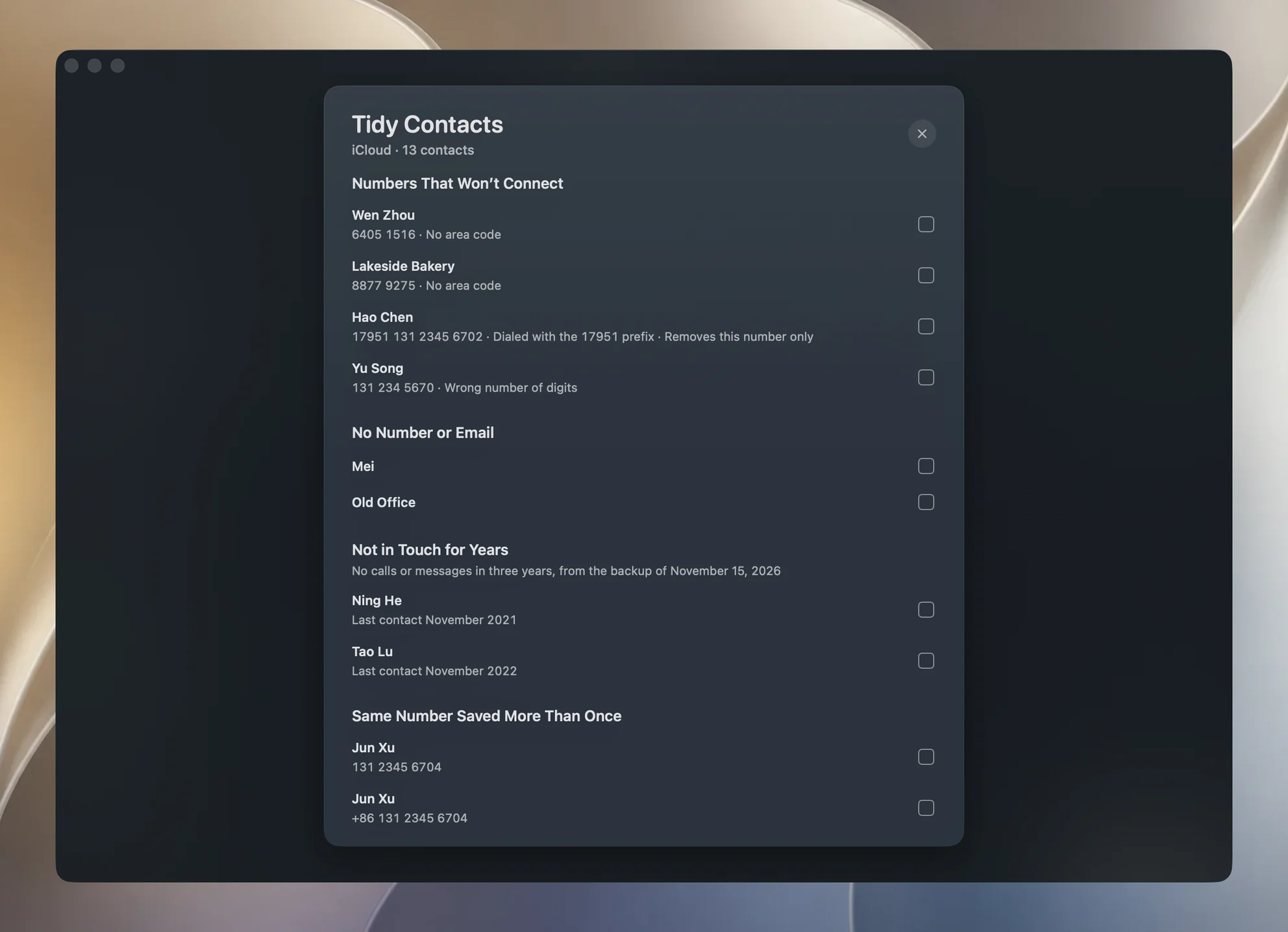
Synced contacts collect junk: cards with no number, numbers that cannot connect, the same person saved twice. Yado's Tidy Contacts, under Organize in the Clean tab, reads the Mac's iCloud account, lists what looks wrong, and deletes only what you tick, with iCloud carrying the deletion to the iPhone. It saves a vCard copy of those cards first, and never reads or changes Gmail, Exchange or On My Mac contacts. The walkthrough is in how to tidy iPhone contacts; this post stops at getting the contacts across.
What goes wrong
Duplicates after turning on iCloud. If the phone and the Mac each had their own lists, turning on iCloud can double people up. Apple's page If you see duplicate contacts after setting up iCloud Contacts says to back up first, then choose Card, Look for Duplicates in Contacts on the Mac and click Merge, repeating until none remain. On the iPhone, View Duplicates under My Card merges cards with matching names.
Contacts in the wrong account. A person saved to the wrong default account never reaches the Mac. Move the card to iCloud and fix Default Account.
Overwriting the wrong side. Finder's Replace Contacts replaces the phone's contacts with the Mac's. Leave it off unless the Mac holds the list you want, and export a vCard or Contacts Archive of the Mac's list before any first sync.
Check the result by counting. Compare the number of cards on the Mac with the iPhone's list, and for a vCard, open it in a text editor and count the BEGIN:VCARD lines. If you deleted something by mistake, Apple's Data Recovery on iCloud.com restores contacts from an earlier date; the restored version replaces the contacts on all your devices, and iCloud saves the current ones first.
FAQ
Does Finder sync copy contacts from the iPhone to the Mac?
Yes, while the phone does not use iCloud Contacts. Apple says the sync runs both ways and adds contacts from the device to the Mac. Leave Replace Contacts off, since it overwrites the phone's list with the Mac's.
Can I export all my iPhone contacts as one vCard?
Yes. Select the cards in the Mac's Contacts and use Export vCard, or use Export All on Contacts in Yado's backup browser for a single Contacts.vcf.
Why does Contacts show fewer people than my iPhone?
Different accounts. The Mac shows only accounts it has, and contacts kept only on the phone never appear on it through iCloud.
Do I need Yado to sync contacts?
No. iCloud and Finder are enough for most people. Yado is for reading contacts out of a backup and cleaning a list that has grown messy.